MediaTek Simple Unlock Tool V2.0 Download 2027
The “MediaTek Simple Unlock Tool V2.0” is a highly popular program used to resolve software-related issues on mobile devices. If you are looking for a tool capable of fixing software malfunctions on Android devices, this program is an excellent choice. Below, we will explore in detail the reasons why it stands out as one of the best alternatives available.
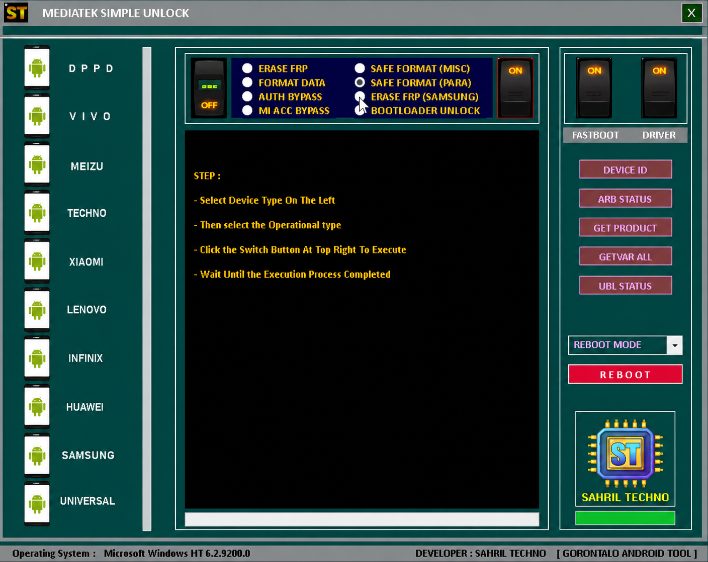
About MediaTek Simple Unlock Tool
This software can be installed on Windows-based desktop and laptop computers and is primarily used by mobile device repair technicians. It helps resolve various issues on Android phones, such as bypassing Factory Reset Protection (FRP) locks, removing pattern or password locks, reinstalling firmware, and addressing situations where a device freezes or becomes unresponsive.
If you work in the repair industry, you will find this tool highly beneficial; its diverse features allow you to handle a wide range of mobile device issues through a single application. The latest version (v2.0) is compatible with modern mobile device models. Furthermore, you can download and use the software for free if you wish to repair your own personal mobile device.
Key Features
Let’s look at some of the best features of MediaTek Simple Unlock Tool V2.0:
- A software’s interface is crucial, and this tool features a simple, user-friendly design.
- Since many Android devices are powered by MediaTek processors, this tool has been specifically designed for them.
- It is lightweight and fast, ensuring rapid processing speeds.
- The tool receives regular updates, enabling it to support the latest mobile models.
What This Tool Can Do
MediaTek Simple Unlock Tool V2.0 is used for a variety of tasks. It addresses several types of mobile software issues, as listed below.
- Detecting MediaTek devices
- Removing pattern locks and passwords
- Basic service operations
- Bypassing FRP
- System connection testing
- Mobile flashing
- Device communication management
- USB port detection
- Reading logs and diagnostic information
Minimum System Requirements
Details regarding the computer specifications required to install the MediaTek Simple Unlock Tool V2.0 setup are provided below.
| Operating System | Windows |
| Storage | 500 MB |
| RAM | 4GB |
| Driver | MediaTek USB Driver |
| USB Cable | OG USB Data Cable |
Download official Link👇