Tuna Pro Tool V3.9 Setup Latest Version Download 2027
Tuna Pro Tool Free Download Updated
Download the latest version of the Tuna Pro tool (version 3.9). Android mobile devices frequently encounter software-related issues, such as Factory Reset Protection (FRP) locks, difficulties with unlocking the screen, general system malfunctions, or errors during the software installation (flashing) process. You can resolve all these issues using the Tuna Pro tool. Since software problems have become common on Android devices, you can install this tool on your personal computer or laptop and use it with your own mobile devices.
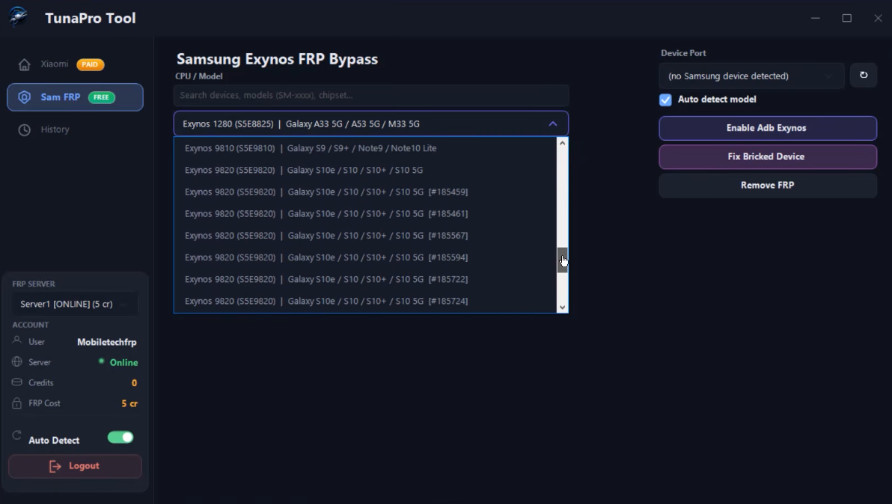
What is Tuna Pro Tool?
This is a newly launched tool designed primarily to fix software issues in Android mobile phones. It supports devices from brands like Samsung, Xiaomi, Mi, Oppo, Redmi, and Poco, as well as devices powered by MediaTek processors. It is a software application that can be installed on Windows laptops and PCs.
A free trial is available, allowing you to use Tuna Pro Tool at no cost. Tuna Pro Tool is lightweight and operates very quickly, requiring minimal system specifications for installation. It helps resolve a wide range of software-related problems on Android devices.
Why is Tuna Pro Tool the best choice?
Let’s explore the key features that make Tuna Pro Tool so popular.
- User-friendly interface
- Minimal system requirements
- Lightweight and fast performance
- Regular updates ensuring support for new mobile models
Supported Mobile Brands
The Tuna Pro Tool is specifically designed for Xiaomi, Redmi, Poco, and Samsung devices; it resolves various software issues on Xiaomi phones. It also supports a wide range of other MediaTek-based mobile devices.
Tuna Pro Tool System Requirements
Installing this tool requires minimal system specifications, the details of which are provided below:
| Requirement | Minimum |
|---|---|
| Operating System | Windows 7/8/10/11 |
| RAM | 2 GB |
| Storage | 200 MB+ |
| Internet | Required |
| Processor | Dual Core + |
Conclusion
Tuna Pro Tool is a recent release, so there isn’t much information available about it online yet. However, I have used it personally and found it to be an excellent tool, thanks to its simple interface and fast processing speed. You need to purchase the tool to use it, but it is very affordable.
If you are a mobile technician, using this tool would be beneficial because it is lightweight and very cost-effective. Furthermore, it does not require any hardware box; you can simply install the Tuna Pro Tool setup and start using it immediately.
Download Official Link👇