Advanced GPT Edition Tool Pro V2.0 Latest 2027
Advanced GPT Edition Tool Pro V2.0 is a sophisticated tool that has gained immense popularity among users in a very short period. It boasts a range of unique features that set it apart from other tools, in addition to being lightweight and remarkably fast. The tool is specifically designed to address a wide spectrum of software-related issues on Android devices, such as bypassing Factory Reset Protection (FRP), resetting lock patterns or passwords, and unlocking screens of various types.
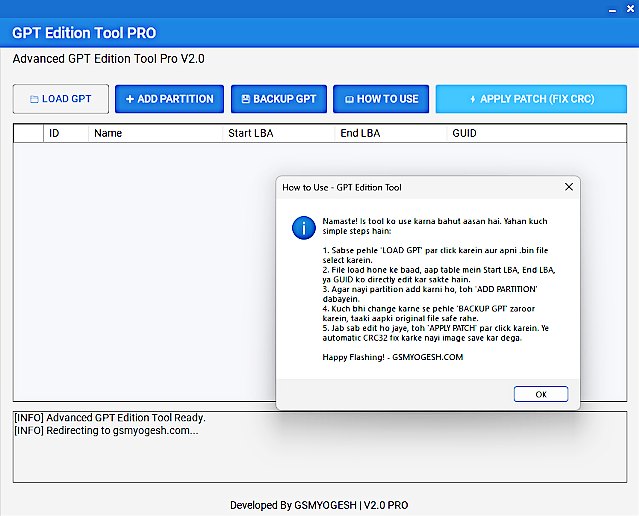
What is Advanced GPT Edition Tool Pro?
Advanced GPT Edition Tool Pro is a multi-functional Android utility tool. It is specifically engineered to diagnose and repair software-related problems. This software can be installed on a laptop or desktop computer. Once installed, the problematic mobile device is connected to the computer (typically via USB) to initiate the repair process. Its primary functions include:
- Bypassing FRP (Factory Reset Protection)
- Removing Patterns / PINs / Passwords
- Assisting with flashing and firmware repair
- Fixing bootloader-related issues
Key Features of Advanced GPT Edition
Here, we will explore the specific features of this tool that have received significant acclaim from users:
- One-Click FRP Bypass: Using this tool, removing Factory Reset Protection (FRP) takes just a few minutes.
- Pattern / Password Unlock: We often forget the pattern or password for our mobile devices; this tool enables you to resolve such issues in a matter of minutes.
- Multi-Brand Support: Advanced GPT Edition Tool Pro supports multiple brands, meaning it can resolve software-related issues on devices from most major Android manufacturers.
- Fastboot & ADB Mode Support: You can connect your mobile device to the tool using either Fastboot or ADB mode. Clean UI (No Confusion): Its interface is extremely simple and easy to understand, providing users with a hassle-free experience a crucial aspect, especially for first-time users.
- No Internet Dependency (Mostly): You can use this tool offline; it generally does not require an active internet connection to function.
Minimum System Requirements
What is the minimum system requirement for installing Advanced GPT Edition Tool Pro V2.0? We’ll learn about this here:
| Component | Requirement |
|---|---|
| OS | Windows 7 / 8 / 10 / 11 (64-bit recommended) |
| RAM | Minimum 4GB (8GB better) |
| Processor | Intel / AMD Dual Core |
| Storage | 500MB free space |
| Drivers | USB Drivers installed (ADB + Fastboot) |
| Internet | Optional (updates) |
Supported Devices & Brands List
Below, we’ve listed the brands that Advanced GPT Edition Tool supports.
| Brand Name | Support Type |
|---|---|
| Samsung | FRP, Flashing, Unlock |
| Xiaomi (Mi / Redmi / Poco) | FRP, Bootloader, Flash |
| Vivo | FRP, Pattern Unlock |
| Oppo | FRP, Unlock |
| Realme | FRP, Flash |
| Huawei | Limited Support (Fastboot) |
| Nokia | Flashing (ADB Mode) |
| Motorola | FRP, Fastboot |
| Infinix | Pattern, FRP |
| Tecno | Unlock, FRP |
| Lava | Basic Support |
| Micromax | Basic Flash & FRP |
| Asus | Fastboot Unlock |
| Sony | Limited Fastboot |
Final Word
The Advanced GPT Edition Tool Pro V2.0 is an excellent choice for anyone looking for a free tool to fix mobile-related issues. You can utilize it to resolve problems with your personal mobile device—and it is, of course, a staple tool for mobile technicians. Furthermore, this tool requires very little storage space for installation.
Download Official Link👇