ClanCells Simple Tools V6.3 Free (Latest Version)
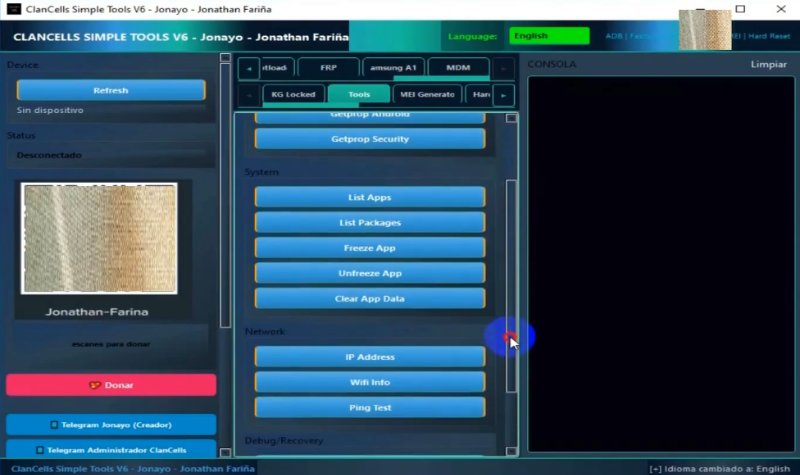
ClanCells Simple Tools V6.3 is a software tool for the Windows operating system, specifically designed for repairing, unlocking, and maintaining Android mobile devices. It is an excellent choice for mobile phone technicians and professionals working in software repair centers, as it offers a wide range of functions that facilitate the resolution of various technical issues. The application features a highly user-friendly interface and is completely secure, allowing you to work with full confidence and peace of mind.
What is the ClanCells Simple Tools?
ClanCells Simple Tools V6.3 is a utility that offers a comprehensive suite of software solutions for Android mobile repair. By utilizing this tool, you can effortlessly resolve software-related issues on any mobile device. This application has been designed specifically for technicians and advanced users. Compatible with Windows PCs, the tool consolidates multiple mobile servicing features into a single platform—including FRP bypass, IMEI repair, bootloader unlocking, and system repair.
We have provided a download link for this tool within this post, allowing you to easily install and begin using it. ClanCells Simple Tools supports smartphones from various brands, and its features enable you to efficiently resolve a wide range of software-related problems.
Features Of ClanCells Simple Tools
We have provided the features in detail below, from where you can very easily access all the information:
- ADB & Fastboot Functions
- FRP & Account Bypass
- IMEI Tools
- Mobile Repair Tools / Knox Removal
- Diag Mode & Advanced Options
ClanCells Simple Tools possesses all the features required to very easily resolve software-related issues across smartphones of any brand.
System Requirements
If you wish to use this tool, it is essential that you know the system specifications—specifically the hardware and software capabilities—required on your computer. You will find this information available below:
- Windows 7 / 10 / 11
- Minimum 4GB RAM
- USB drivers installed
How to Install & use ClanCells Simple Tools
The following step-by-step process let you easily install the Tool on your Windows computer and also helps you to unlock your Android phones. So, follow below process completely.
1. Download the ClanCells Simple V5 Tool to your Computer.
2. Extract the setup using Windows extractor, 7zip or WinRar.
3. Run the tool with Administrator permission.
4. Install the program like other Windows programs.
5. Once installation is completed, click finish.
6. Go to your Desktop screen & Run ClanCells.exe as Administrator.
7. Now the tool will opened.
8. Erase FRP: Run the tool > Select chipset of the phone or go to Brand’s Tab > Select Remove FRP > Now follow the log screen instructions to connect the phone > Done.
9. Flash Firmware: Go to Chipset tab > Select Firmware Flashing > Select the firmware > Power Off & connect the phone to PC.
10. Format Data: First Select the MTK, Qualcomm, UniSOC or Brand > Click Format > Follow on screen instructions & Connect Phone > Done.
Conclusion
If you work in the field of mobile software repair, you have come to exactly the right place. ClanCells Simple Tools V6.3 is a powerful and multi-purpose mobile repair tool designed to help you resolve a wide range of software-related issues. With this tool, you can repair the software of virtually any Android phone. However, you must exercise caution while using it; if you do not possess comprehensive knowledge of the tool, please ensure you thoroughly familiarize yourself with its operation before proceeding, so as to avoid incurring any potential damage or loss.
Download Official Link👇