MCT OFP Extractor Tool [Free] Latest Download 2027
MCT OFP Extractor Tool V1.0 Download 2027
The “MCT OFP Extractor Tool” is used to extract firmware from Android devices. Smartphones from brands such as Oppo, Realme, and OnePlus typically release their original firmware in the “OFP” format, and this tool is used to perform the extraction process. “MCT OFP Extractor” can be installed on Windows-based computers or laptops, allowing users to easily access the partition files and images contained within the firmware file.
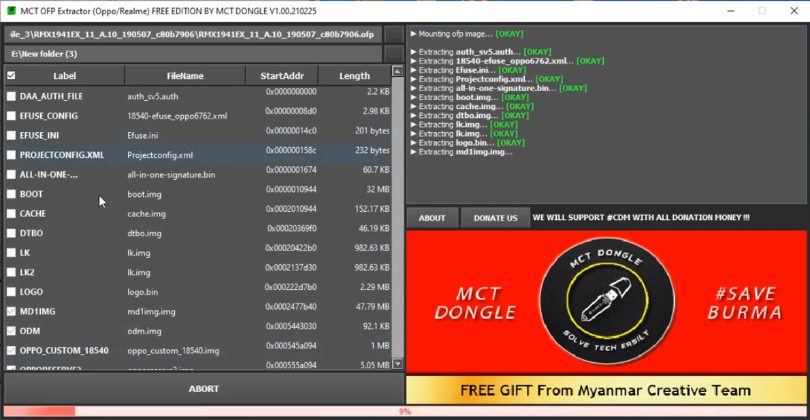
What is the MCT OFP Extractor Tool?
The MCT OFP Extractor is a compact yet highly useful software application designed primarily to extract OFP firmware files. It is widely used by mobile technicians. Unlike standard ZIP files, OFP files require specialized tools for extraction; this tool enables users to extract OFP firmware with just a single click. We have detailed the features of this tool below.
Key Features of MCT OFP Extractor
Here, we explore the best features of this tool and why it is so popular:
- Simple Interface: One of the best qualities of any tool is ease of understanding for new users.
- Fast Extraction: It can extract even very large OFP files within minutes.
- Firmware File Support: It supports various types of firmware.
- Safe Extraction: It is capable of extracting files without causing any data corruption.
System Requirements
Details regarding the minimum system requirements for using the MCT OFP Extractor Tool are provided below:
| Operating System | Windows 7, 8, 10, 11 |
| RAM | 2GB UP |
| Storage | Minimum 500MB |
| processor | Intel / AMD |
| .NET Framework | Install if necessary |
Which files are obtained after extracting an OFP file?
Here, we will look at the files typically found after extracting firmware; a brief overview is provided below:
| File Name | USE |
|---|---|
| boot.img | Boot Partition |
| recovery.img | Recovery Environment |
| system.img | Android System |
| vendor.img | Vendor Files |
| userdata.img | User Data Partition |
| vbmeta.img | Verification Metadata |
| dtbo.img | Device Tree Blob |
Conclusion
You can install the MCT OFP Extractor Tool on a Windows PC or laptop. This tool is used to extract OFP firmware. It is very lightweight, and I have used it personally. If you also want to extract your firmware, you can use this tool for free.
Download Official Link👇