MDM Fix Pro Unlock Tool for iPhone, iPad & Android Download
MDM Fix Pro Unlock Tool Free Download (Login Added)
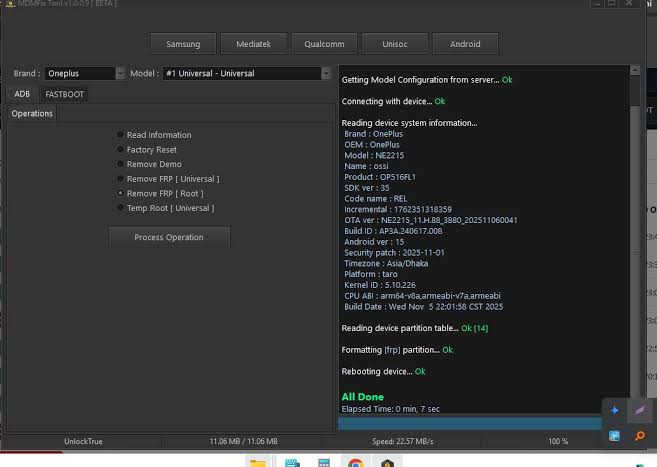
MDM Fix Pro Unlock Tool includes a wide range of features designed for Qualcomm, MTK, Samsung, Xiaomi, iPhone, and PAC devices. It provides technicians with a unified platform for tasks such as flashing firmware, removing Factory Reset Protection (FRP) locks, performing resets, and other maintenance operations. Currently, the tool does not retrieve device model numbers due to server-side restrictions imposed by the developer. You can still use the software, but model names will not appear automatically. Please be aware that you use this tool at your own risk, as I cannot guarantee that it will function correctly in every instance.
Features MDM FIX PRO UNLOCK TOOL
1. Xiaomi / Mi / Micloud Tools
Mi-Flash Module
- Model selection
- Firmware version selection
- Firmware download
- Firmware Info
- Show All Firmware
- Flash Micloud ROM
- Protect EFS
- Erase EFS
- Reset Micloud
- Disable Micloud
- Full Flash
- Bypass Anti-RB
- Custom Flash Mode
- Fastboot Flash (EMMC)
Mi Security / Sideload / Meta
- Read Info
- Format Data
- Erase FRP
- Wipe EFS
- Reset / Disable Micloud
- Fastboot FRP (1 & 2)
- Fastboot Micloud Removal
- Meta Read Info
- Meta Format Data
- Meta Erase FRP
- Meta Reset Micloud
2. Samsung Tools
Odin Flash
- BL, AP, CP, CSC, UMS loading
- Auto-add firmware files
- NAND Erase, Skip MDSL
- Complete Odin Flash support
Samsung Security
- Erase Knox
- Erase FRP (New/Old methods)
- Write ENG EFS
- Softbrick Fix
- Factory Reset
- Read Info
Samsung ADB Tools
- ADB Erase FRP 1 & 2
- Disable Knox
- Disable KG Locked
- Disable OTA Update
- Remove Samsung Account
- Reset Screen Lock
COM / MTP
- COM Read Info
- COM Factory Reset
- Enter Download Mode
- Remove FRP 2022
- MTP FRP Bypass
- MTP Install Drivers
3. Qualcomm Tools (EDL / DIAG / Flash)
Qualcomm Flash
- Erase / Read / Write partitions
- Read FBL
- Full Flash
- Flash Protect EFS
- Flash Wipe Userdata
- XML firmware support
- Firehose loader selection
- Boot Device / Reboot options
- Server firmware support
Qualcomm EDL Functions
- Backup EFS
- Restore EFS
- Wipe EFS
- Reset VIN ID
- Reset Micloud
- Factory Reset
- Erase FRP
- Safe Format
- Full Dump
- Unlock Bootloader
- Boot Slot A/B management
- Reboot to EDL
Qualcomm DIAG Tools
- Write QCN
- Read QCN
- Write IMEI
- ADB Enable DIAG
- ADB Enable DIAG ROOT
- NV Editor (SPC, IMEI1, IMEI2, MEID)
4. MTK Tools (Old + Meta + Universal)
MTK Old Flash
- Download Only
- Firmware Upgrade
- Scatter loading
- Custom/Auth DA
- Preloader/EMI selection
- Bypass Auth
- Dump Mode
- Layout selection
MTK Meta
- Boot META
- Read Info
- Erase FRP
- Factory Reset (EMMC/UFS)
- Android 11 Reset methods
- Safe Format (1 & 2)
MTK Universal (New)
One Click Mode
- Backup NV
- Restore NV
- Wipe NV
- Repair IMEI
- Format Data
- Erase FRP
- Read RPMB
- Write RPMB
- Erase RPMB
- Fix Orange State
- Fix RMPB
- Patch DM-Verity
- Flash
- Readback
- Bypass Auth
- Force BROM
- Health Check
5. BROM / EDL Combined Tools
- ADB Read Info
- ADB Erase FRP
- ADB Factory Reset
- Fastboot Erase FRP (QC & MTK)
- Fastboot Factory Reset
- MTP Read Info
6. Apple / iOS Tools (Ramdisk + DFU + Purple Mode)
Ramdisk DFU Tools
- Fix USB D+
- DFU Driver
- Read iOS
- Download IPSW
- Enter PWND DFU
- Select Ramdisk
- Fix Mount / Fix Mount 2
- Boot DIAG
- Boot Ramdisk
Passcode / Disabled Tools
- Backup Passcode
- Restore Passcode
- Restore Backup + Disable OTA
Utilities
- Read Account
- Read HW Info
- Create ICInfo.SISV
- Disable OTA
- Erase All
- Factory Reset
- Hidden iCloud
Hello Bypass
- Get Activation
- Bypass Hello
- Bypass Hello + Disable OTA
- Server-based SN activation
7. Apple DIAG Purple Mode
- Open Serial
- Refresh Ports
- Write Serial Number
- Backup Serial Number
- Factory Reset
- Reboot
8. PAC / Spreadtrum Toolset
- Firmware Info
- Keep Charge Feature
- PAC Firmware Load
- Factory Reset
- Erase FRP
- Read RPMB
- Write RPMB
- DIAG IMEI Writing
- Flash
- Readback
9. ADB / Fastboot / Device Manager
ADB Panel
- Read Info
- FRP Tools
- Bootloader Tools
- OTA Disable
- Diag Enable
- Screen Lock Reset
Fastboot Panel
- Bootloader unlock/lock
- Slot control
- FRP wipe
- Flash operations
Manager
- Live logs
- USB/COM auto-detect
- Fast Connect
- Partition reader
10. Global Utility Layer
- Boot Device
- Reboot Device
- Partition Table View
- Begin/End Address viewer
- YouTube Help Integration
- Multi-brand support banner
- Dark UI optimized layout
How to Install and Login MDM FIX PRO (Free Tool)
Step 1: Run the main tool as administrator
Open the folder and right-click MDM FIX PRO UNLOCK TOOL Beta.exe, then select Run as administrator.
Step 2: Extract the login patch file
Extract Unlock_Tool_MDM_FIX_Login.rar and open the EXE inside it.
Download Official Link👇